From Grey Boxes to a Colony: Building Horizon
In the last week of September 2026, I submitted Horizon to the App Store. Horizon is an idle colony game: the world ended in 2028, you start with a scrap pile, and you build a civilization out of it. Five divisions, eleven generators each. Every generator produces the one below it, and the numbers climb from one to quadrillions, then into letters. This is the story of how it came together — the engine, the interface, the art pipeline, and the part that surprised me most: the bugs that only showed up on a real phone.
Engine First
Idle games are harder than they look. When the player closes the app, production doesn’t stop. When they come back eight hours later, the game has to compute all eight of those hours in a few hundred milliseconds — and the result has to be exactly what it would have been if they had never put the phone down. One unit off, and players notice.
So the first decision wasn’t about the interface. It was about time. Horizon’s engine doesn’t treat time as a flow; it treats it as an ordered sequence of events. There are two kinds: fixed-interval ticks, and the end of manually started production cycles. At every step, the engine jumps to the earliest next event:
export function advance(s: GameState, ctx: SimContext, dtS: number): AdvanceResult {
  const end = s.clock + dtS;
  for (;;) {
    const nextTick = (Math.floor(s.clock / TICK_S) + 1) * TICK_S;
    const nextEnd = nextManualEnd(s);
    const at = Math.max(s.clock, Math.min(nextTick, nextEnd));
    if (at > end) break;
    s.clock = at;
    if (nextEnd <= at) completeDueCycles(s, ctx, at);
    if (nextTick <= at) step(s, ctx);
  }
  s.clock = end;
}
Live play calls this function every frame, in steps of roughly 16 milliseconds. Offline progress calls the same function with eight hours. Time warps do the same. All three process the same events in the same order, so the result is independent of frame rate. Even randomness is deterministic: every tier rolls exactly once per tick, and critical production reads from that roll.
I didn’t want to leave that as a claim. The test suite has tests like this: play eight hours live, frame by frame; compute the same eight hours offline in one go; compare the two saves. Play three hours, save, load, play five more — compare with eight uninterrupted hours. 430 tests in total. An eight-hour catch-up takes around 300 milliseconds on a Mac.
Skeleton First, Paint Last
I applied the same discipline to the interface: structure before color, texture, or art. The first screens were nothing but grey boxes. Every box was measured in points, every row height was calculated, but nothing was “pretty.” That was deliberate. A screen without paint can’t hide a hierarchy mistake. If a number is in the wrong place, there’s no glow to rescue it.
Below is four days of the colony screen. Left to right: the skeleton on September 21; midday on the 22nd, settled into the genre’s classic layout but still grey; the same evening with painted frames; September 24, with simplified rows; and today, as it appears on the App Store.
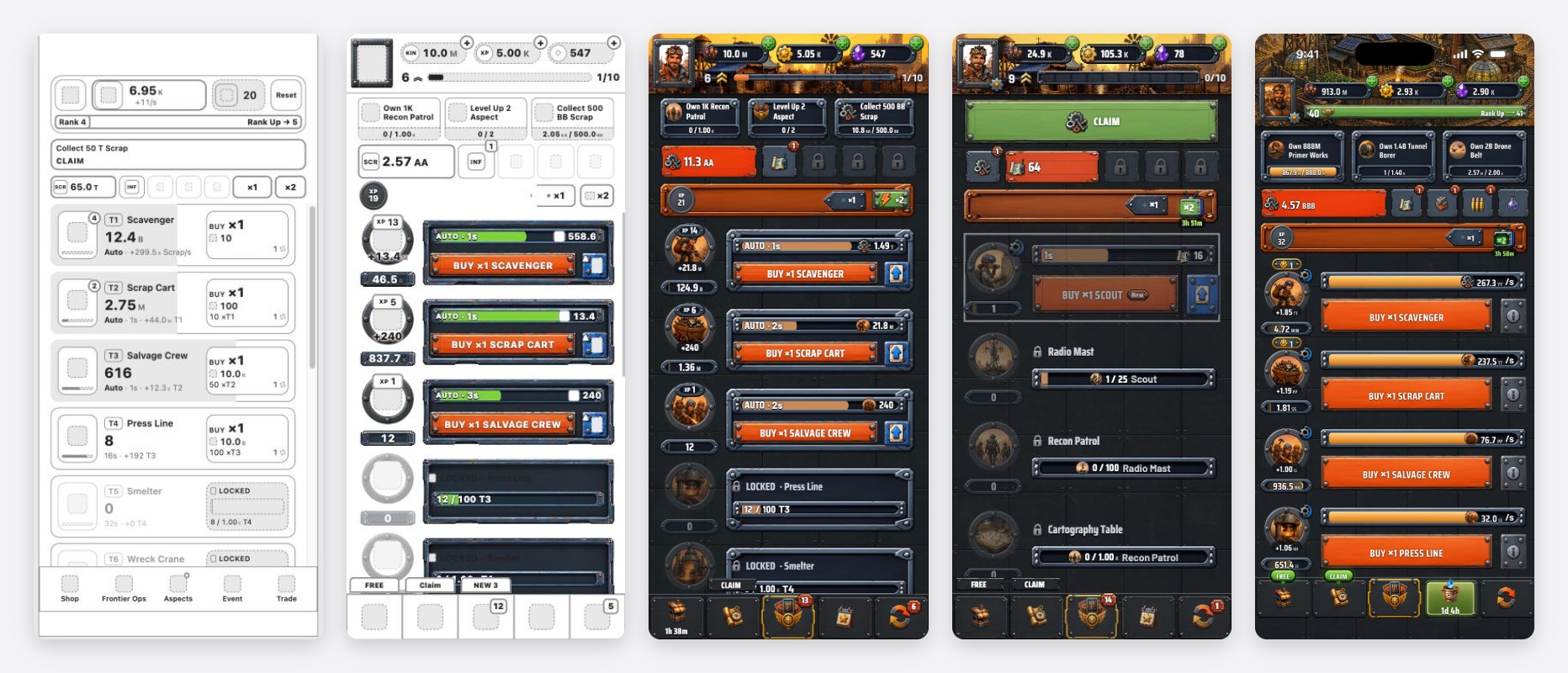
The real gain of the skeleton stage was speed. Without paint, rearranging a row takes minutes. Once the paint arrives, the same change means recutting an image and re-measuring its slices.
Frames: 9-Slice
The metal panels, buttons and production bars in the game are each drawn from a single image that can stretch to any size. The technique is called 9-slice: the image is cut into nine pieces, the corners stay fixed, and the edges and center stretch. On the web, that’s border-image:
.bar.track {
  border-style: solid;
  border-width: 0;
  border-image: url("ui-bar-track.webp") 36 52 29 52 fill / 9px 15px 7px 15px stretch;
}
The first four numbers are where the slice lines fall in the source image — in pixels. That small detail creates a big constraint: these images can never be resized. Halve the image and the slices land in the wrong place; the corners start to stretch. The art pipeline has a single rule for these files: never touch the size, only the format.
The Art Pipeline
There are more than 250 painted illustrations in the game: portraits of 95 historical figures, 55 generators, packages, icons, backgrounds. They all need to share one style, and they all need to enter the game under the same rules. So I wrote a single script. Source images go into one folder; the script reads each filename’s prefix and decides what to do:
| Prefix | What | Rule |
|---|---|---|
asp- | Portrait | Crop to the card’s frame (1 : 1.15), scale to 570 × 656 |
ui- | 9-slice piece | Size never changes, only the format |
bg- | Background | Size never changes, no alpha channel |
char- | Character | Find the figure, align by the feet, place on a square |
| everything else | Object | Remove the flat background from the edges, soften the edge |
The script only regenerates what has changed, and it runs on its own before every dev session and build. Replacing an illustration means dropping a file with the same name into the folder. Nothing else.
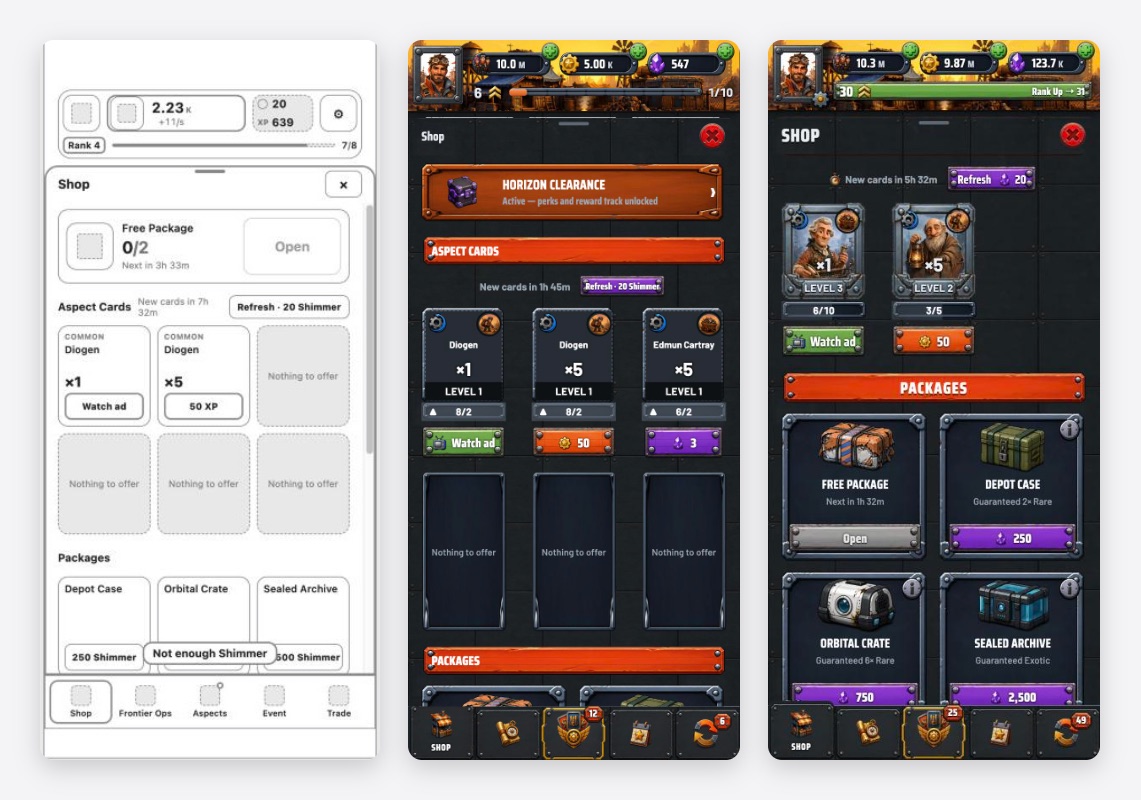
The same process played out across every screen. The shop:
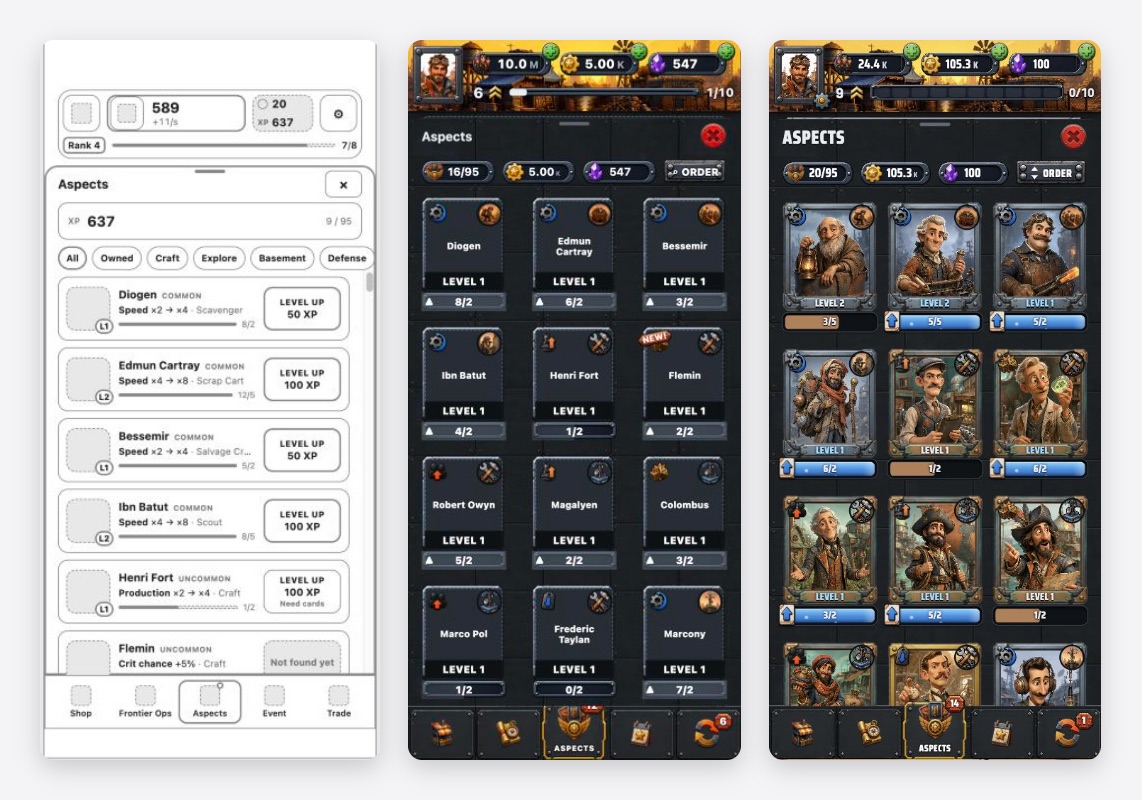
And the collection screen, where all 95 figures live. Here the skeleton started as a list and became a grid of cards. Cards won because what the player actually looks at isn’t a name. It’s a face:
What the Phone Told Me
In the browser, everything was flawless. The evening I installed the game on my own phone through TestFlight, four bugs appeared that the browser had never shown me. They all share one thing: the code was right, but an assumption was wrong.
Bars Waiting for the Second
The production bars of automated generators would fill, wait a beat at full, then reset. Stranger still, all the bars reset at the same moment, as if they were waiting for each other.
The cause was in the engine. Automated production pays out on fixed one-second ticks — that’s the price of determinism. A 3.5-second cycle doesn’t pay at 3.5; it pays on the tick at 4. And the bar was tracking the payout: it filled and waited for the tick. Since every automated bar reset on the same whole seconds, the screen looked synchronized.
The fix was to change the bar, not the engine. The engine still pays on the tick; the bar now wraps on its own cycle:
// before: once full, wait for the tick
return Math.min(1, (t.cycleElapsed + tickPhase(clock)) / cycle);

// after: every tier turns on its own cycle
return ((t.cycleElapsed + tickPhase(clock)) % cycle) / cycle;
One % sign. The payout can still be up to a second late, but the eye doesn’t notice that. What it notices is every bar breathing at its own pace. For generators whose cycle is shorter than a second, the bar now stays full with a stripe streaming across it. A bar that resets ten times a second isn’t information. It’s noise.
The Vanishing Frame
Buying from a generator just before its bar filled made the bar and its frame disappear for a single frame, right as it completed.
This one is a WebKit bug. When an ancestor finishes a transform animation and gets repainted, a border-image inside it is sometimes not drawn at all. Buying played an animation that nudged the whole row up by two pixels; at the same moment, the production trigger scaled the icon. When the two animations ended together, the frame was skipped. Moving only the buy button instead of the whole row made it go away. I’d met the same bug before on the collection cards; there, the fix was to replace the card frame’s border-image with a pre-rendered image.
Two Colonies
Every time I left the game and came back a few minutes later, it asked: “Two saves found. Local or cloud?” Both options showed the same time.
On launch, the game compares the cloud save’s timestamp with the one this device last uploaded. If they match, the cloud is this device’s continuation — no question. The problem was the clock I used to keep time. To avoid trusting the device clock, the game advances its own time with performance.now() — and performance.now() returns fractions of a millisecond. The ISO date format that goes to the cloud, however, stops at the millisecond:
const local = 1790453489849.37;              // the game's clock
const cloud = Date.parse(new Date(local).toISOString());
// → 1790453489849
local === cloud;                              // false — on every launch
The two numbers were never equal. On every launch, the game mistook its own save for another device’s. The fix was to compare in whole milliseconds. Thirty-seven hundredths of a millisecond opened a dialog on every launch.
Silent Sound
Sending the game to the background and coming back killed all sound. The strange part: watching an ad brought it back.
On return from the background, iOS reported the Web Audio context as running, yet nothing came out. Calling resume() did nothing, because the context was already “running.” Once I understood why the ad fixed it, the solution was obvious: opening an ad suspended the context, closing it resumed it, and that suspend-and-resume cycle rebuilt the audio path. Now the game runs the same cycle itself — when it returns from the background, and again on the first touch.
| Symptom | Cause | Fix |
|---|---|---|
| Bars wait at full, reset all together | Payout on the whole second, bar tracks the payout | Bar wraps on its own cycle (%) |
| Frame vanishes for one frame | WebKit skips border-image after an animation | The button moves, not the row |
| ”Two saves” dialog on every launch | Fractional ms ≠ truncated ms | Compare in whole milliseconds |
| No sound after returning | Context “running” but silent | Suspend and resume on return |
Horizon in Numbers
| Divisions | 5 |
| Generators | 55 |
| Historical figures | 95 |
| Painted illustrations | 250+ |
| Languages | 10 |
| Audio | 1 music track, 28 effects |
| Tests | 430 |
| Code | ~42k lines of TypeScript and Svelte |
Final Thoughts
In an idle game, the thing the player looks at most is a bar. It fills, it resets, it fills again — for hours. When that bar waits half a second too long, the game feels “off,” even if no one can say why.
None of the four TestFlight bugs were visible in the browser. Each was an assumption meeting a real device: that a second is whole, that drawing is reliable, that a millisecond is a millisecond, that “running” means running.
The engine came first, because trust comes first. The skeleton came before the paint, because structure comes before ornament. And the phone came after everything — because it gets the last word.
The bar isn’t decoration. It’s the game’s clock.